목차
[1] basic plate 작성
[2] DB용 private subnets 작성
[3] DB subnet group 작성
[4] APP SG -> DB SG 작성
[5] RDS 작성
[6] EC2 작성
[7] EC2 -> RDS 액세스 테스트
[8] RDS 페일오버 테스트
---------------------------------------------------
기본 아키텍쳐 작성
-> DB는 private subnet이 사용되므로
해당 구조로 수정
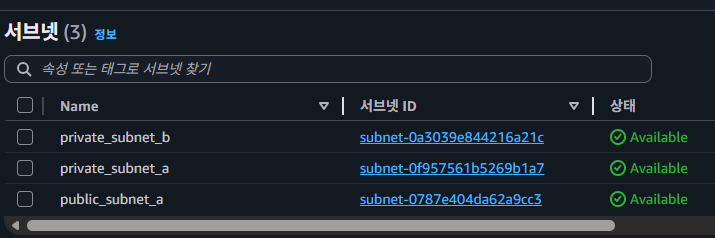
# [2] subnets
resource "aws_subnet" "public_a" {
  vpc_id                  = aws_vpc.main.id
  availability_zone       = "ap-northeast-2a"
  cidr_block              = "10.7.1.0/24"
  map_public_ip_on_launch = true
  tags = {
    Name = "public_subnet_a"
  }
}

resource "aws_subnet" "private_a" {
  vpc_id                  = aws_vpc.main.id
  availability_zone       = "ap-northeast-2a"
  cidr_block              = "10.7.2.0/24"
  map_public_ip_on_launch = false
  tags = {
    Name = "private_subnet_a"
  }
}

resource "aws_subnet" "private_b" {
  vpc_id                  = aws_vpc.main.id
  availability_zone       = "ap-northeast-2b"
  cidr_block              = "10.7.3.0/24"
  map_public_ip_on_launch = false
  tags = {
    Name = "private_subnet_b"
  }
}

# [3] igw / NAT gw
resource "aws_internet_gateway" "igw" {
  vpc_id = aws_vpc.main.id
}

resource "aws_eip" "eip" {
  domain = "vpc"
  tags = {
    Name = "nat-eip"
  }
}

resource "aws_nat_gateway" "natgw" {
  allocation_id = aws_eip.eip.id
  subnet_id     = aws_subnet.public_a.id

  depends_on = [aws_internet_gateway.igw]

  tags = {
    Name = "main-nat-gw"
  }
}

# [4] route table
resource "aws_route_table" "public_rt" {
  vpc_id = aws_vpc.main.id
  route {
    cidr_block = "0.0.0.0/0"
    gateway_id = aws_internet_gateway.igw.id
  }
  tags = {
    Name = "public-rt"
  }
}

resource "aws_route_table" "private_rt" {
  vpc_id = aws_vpc.main.id
  route {
    cidr_block     = "0.0.0.0/0"
    nat_gateway_id = aws_nat_gateway.natgw.id
  }
  tags = {
    Name = "private-rt"
  }
}

# [5] assoc
resource "aws_route_table_association" "assoc_a" {
  subnet_id      = aws_subnet.public_a.id
  route_table_id = aws_route_table.public_rt.id
}

resource "aws_route_table_association" "private_assoc_a" {
  subnet_id      = aws_subnet.private_a.id
  route_table_id = aws_route_table.private_rt.id
}

resource "aws_route_table_association" "private_assoc_b" {
  subnet_id      = aws_subnet.private_b.id
  route_table_id = aws_route_table.private_rt.id
}
-



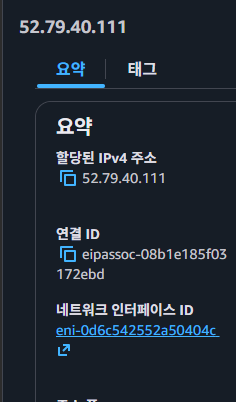
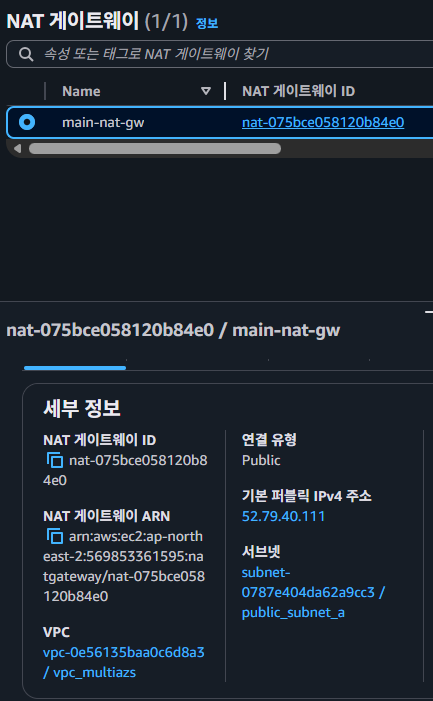
[4]
DB Subnet Group
resource "aws_db_subnet_group" "main" {
  name       = "main-db-subnet-group"
  subnet_ids = [
    aws_subnet.private_a.id,
    aws_subnet.private_b.id
  ]

  tags = {
    Name = "main-db-subnet-group"
  }
}

-
[4]
APP Security Group
# [7] APP Security Group
resource "aws_security_group" "app_sg" {
  name        = "app-sg"
  description = "App server security group"
  vpc_id      = aws_vpc.main.id

  #http
  ingress {
    description = "HTTP from internet"
    from_port   = 80
    to_port     = 80
    protocol    = "tcp"
    cidr_blocks = ["0.0.0.0/0"]
  }

  #https
  ingress {
    description = "HTTPS from internet"
    from_port   = 443
    to_port     = 443
    protocol    = "tcp"
    cidr_blocks = ["0.0.0.0/0"]
  }

  egress {
    from_port   = 0
    to_port     = 0
    protocol    = "-1"
    cidr_blocks = ["0.0.0.0/0"]
  }

  tags = {
    Name = "app-sg"
  }
}
DB Security Group
resource "aws_security_group" "db_sg" {
  name        = "db-sg"
  description = "Allow MySQL from app only"
  vpc_id      = aws_vpc.main.id

  ingress {
    description     = "MySQL from app"
    from_port       = 3306
    to_port         = 3306
    protocol        = "tcp"
    security_groups = [aws_security_group.app_sg.id] # 앱 서버 SG
  }

  egress {
    from_port   = 0
    to_port     = 0
    protocol    = "-1"
    cidr_blocks = ["0.0.0.0/0"]
  }
}

-
[5]
RDS Instance (Multi-AZ = true)
resource "aws_db_instance" "db" {
  identifier              = "main-mysql"
  engine                  = "mysql"
  engine_version          = "8.0"
  instance_class          = "db.t3.micro"
  allocated_storage       = 20
  storage_type            = "gp3"
  storage_encrypted       = true

  username                = var.db_username
  password                = var.db_password

  db_subnet_group_name    = aws_db_subnet_group.main.name
  vpc_security_group_ids  = [aws_security_group.db_sg.id]

  multi_az                = true
  publicly_accessible     = false

  port                    = 3306
  db_name                 = "appdb"

  backup_retention_period = 7
  maintenance_window      = "sun:16:00-sun:17:00"
  backup_window           = "15:00-16:00"

  deletion_protection     = false
  skip_final_snapshot     = true

  # 운영에서는 보통 true로 관리 + 별도 변경절차를 둠
  apply_immediately       = true

  tags = {
    Name = "main-mysql"
  }
}


# Variables.tf
variable "db_username" { type = string }
variable "db_password" { type = string  sensitive = true }

# Outputs.tf
output "db_endpoint" {
  value = aws_db_instance.db.address
}

output "db_port" {
  value = aws_db_instance.db.port
}

output "db_name" {
  value = aws_db_instance.db.db_name
}
-
[6]
EC2 작성
# [10] test EC2
resource "aws_instance" "db_client" {
  ami           = "ami-0c9c942bd7bf113a2"
  instance_type = "t3.micro"

  subnet_id = aws_subnet.private_a.id

  vpc_security_group_ids = [
    aws_security_group.app_sg.id
  ]
  user_data = <<-EOF
  #!/bin/bash
  set -eux
  # ec2-user 비번 설정
  echo 'ubuntu:password' | chpasswd
  EOF

  associate_public_ip_address = false
  tags = {
    Name = "db-client-ec2"
  }
private에 넣어뒀고 pem key 말고 때문에 SSM이나 기타 접속 쓰지 않고
비번 미리 넣어놓고 시리얼 커넥션이 편함


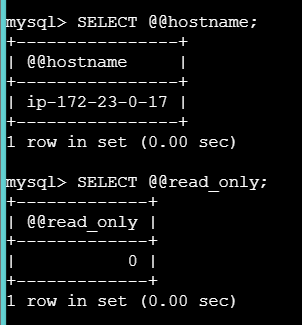
apt update
apt install -y mysql-client
mysql --version
mysql -h <RDS_ENDPOINT> \
	-P 3306 \
	-u <username> \
	-p
pw입력

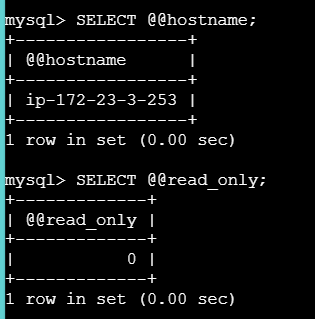
SELECT @@hostname;
SELECT @@read_only;
'[2] 250909~ 클라우드 > [b] 12월 : Terraform + Ansible' 카테고리의 다른 글
| [34] tier-3 (0) | 2026.02.04 |
|---|---|
| [33] S3 + cloudfront (0) | 2026.01.31 |
| [31] ALB + ASG (0) | 2026.01.22 |
| [30] Github -> Ansible (0) | 2026.01.12 |
| [29] Ansible (0) | 2026.01.12 |