Workflow runs · riptae/aws-ansible
---------------------개요---------------------------------------------
이전에는 내 Windows PC 에서
local -> local 코드 -> terraform apply -> Aws API -> 리소스 생성
local (wsl) -> ansible inventory + playbook -> EC2 Public IP -> 설정(nginx)
-------------------------Github Actions------------------------------
지금은 아예 github에 Push -> Github runner 임시 서버에서
- github 코드로 terraform apply
- inventory 자동생성
- wsl -> ansible 설치 -> inventory + playbook -> EC2 public IP
로 리소스 생성 + 관리 자동화
--------------------------------------------------------------------------------------
새롭게 추가되는 것
1.
./github/workflows
ㄴ deploy.yml
-> 체크아웃
-> AWS credentials
-> 여기서 테라폼 cmd
-> ansible설치
-> SSH key 생성
-> inventory 생성
-> playbook
2.
/scripts/
ㄴ gen_inventory.sh
-> public ip output 받아서 자동생성
3.
github secrets에 SSH private key 넣어두고
ansible에서 사용할 수 있게 키 생성 (deploy)
4.
기존 내 windows Local이 아닌, github actions에서 AWS 리소스 생성할 수 있도록 AWS 크레덴셜 작업
--------------------------------------------------------------------------------------------------------------------------------
OIDC
1 : arn 생성
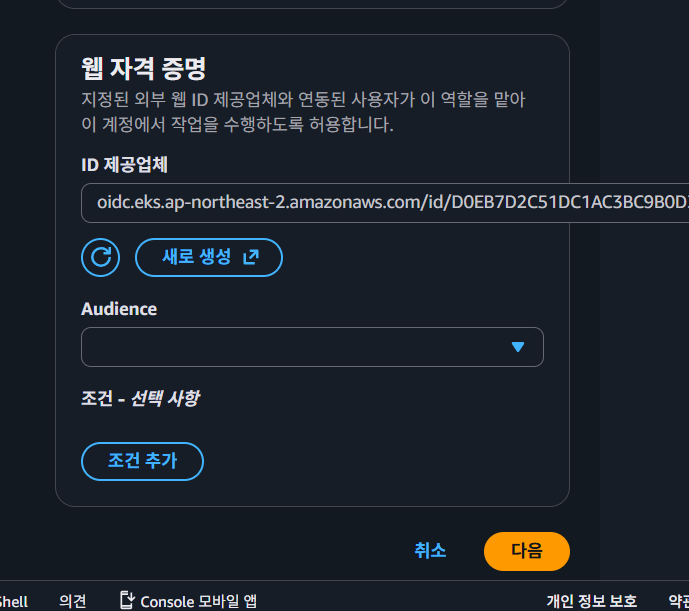
IAM -> ACCESS mgmt -> Identity Providers -> OpenID connect
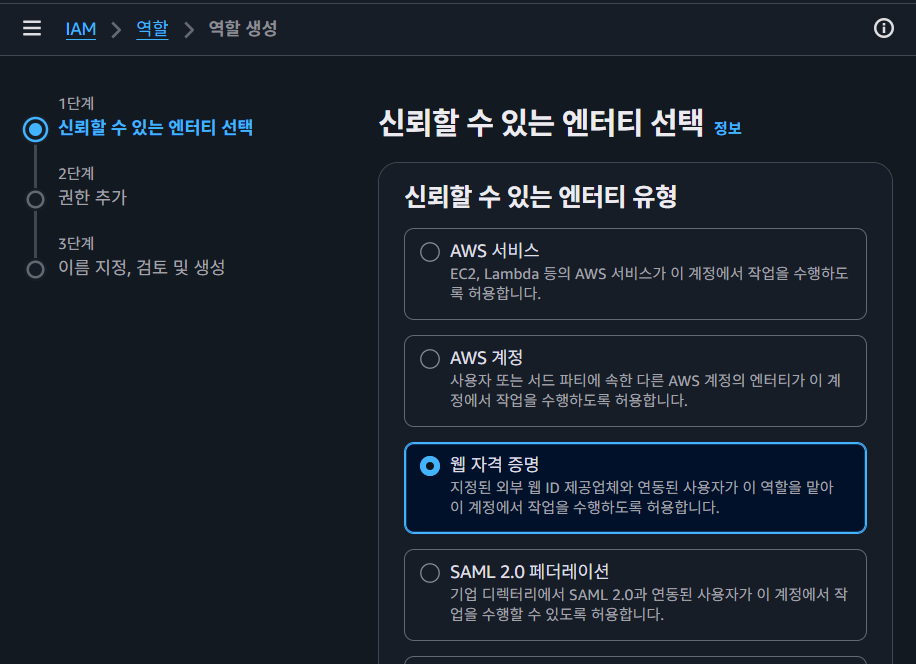
2 : IAM Role 생성
Github Actions가 AssumeRole로 사용할 예정
Create Role -> Web Identity -> Identity Provider 삽입 -> Githup REpo를 조건으로 넣는다
---------------------------------------------------------------------------------------------------------------
주로 SSH키 생성에서 오류 발생


'[2] 250909~ 클라우드 > [b] 12월 : Terraform + Ansible' 카테고리의 다른 글
| [57] 프로젝트 개설 : #0 (0) | 2026.03.15 |
|---|---|
| [55] EC2 public ip OVERRIDE (0) | 2026.03.02 |
| [54] aws s3 ls 시 (환경변수 / credentials / IMDS slot) (0) | 2026.02.18 |
| [53] AWS APP mesh (0) | 2026.02.17 |
| [52] "EC2 Launch Type" vs "ECS Fargate" (0) | 2026.02.17 |